Who can use it: care-home managers and administrators.
Where to find it
Open Settings → Menu access, and a person's Access section in their staff record.
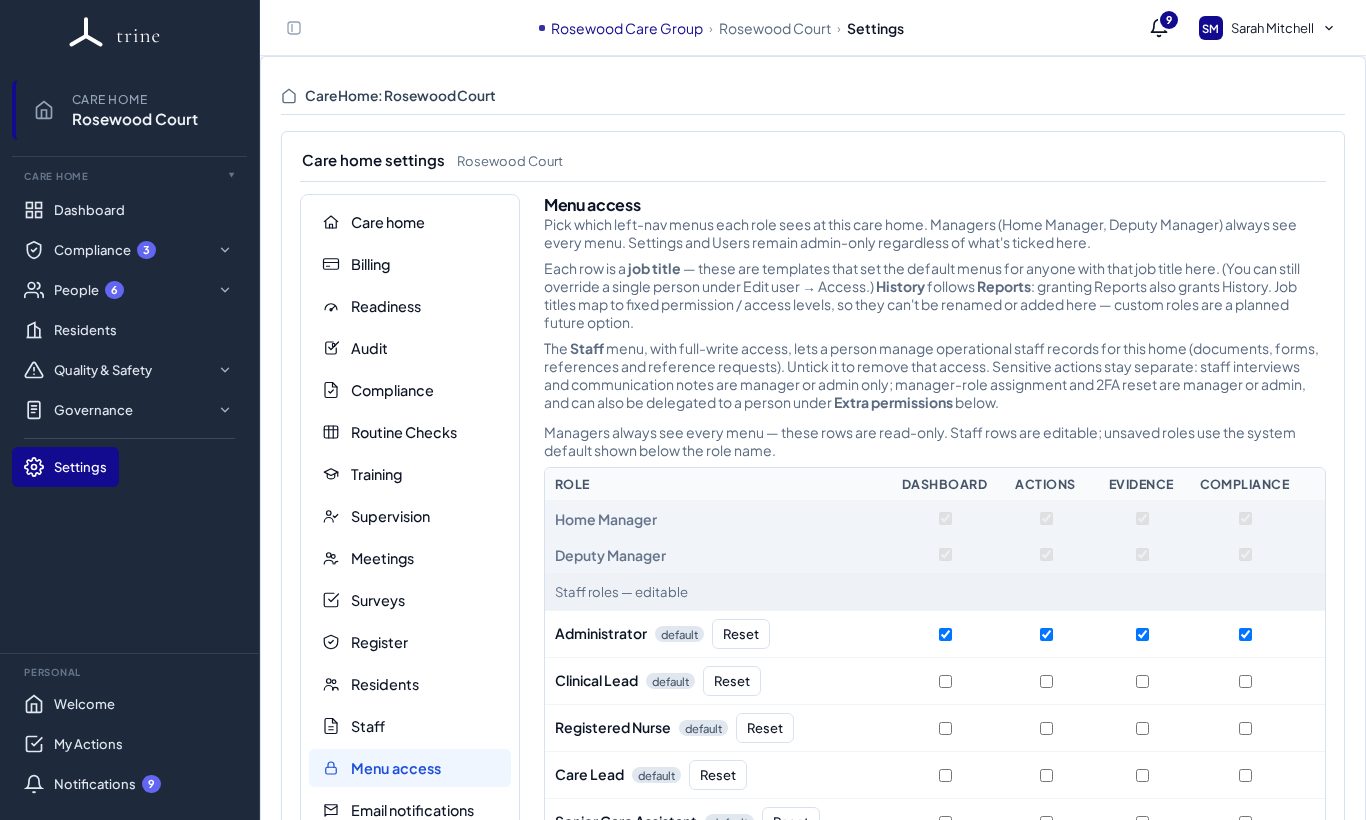
How to
- Each row is a job title; each column is a menu (Dashboard, Actions, Evidence, Compliance and so on). Tick the menus each job title should see.
- Home Manager and Deputy Manager always see every menu, so their rows are fixed.
- Rows marked default use Trine's standard set; Reset puts a row back to the default.
- To give one person different access from their job title, open their staff record → Access.
- Use Extra / Additional permissions there to grant a specific sensitive capability — for example managing staff-resource files, reviewing training, signing off competencies, staff communication or Manage readiness tracking routes — without making them a manager.
What to expect — two different things
- Menu access controls which pages a person can open. The grouped menu shows only the pages they can access, and hides a whole group when none of its pages are available.
- Additional / delegated permissions grant specific sensitive capabilities. For example, Manage readiness tracking routes lets a person choose where a readiness requirement's evidence is tracked (Administrators have it by default; it needs the Dashboard menu and full access).
- A person's role, care-home scope and the home's plan can all affect what they ultimately see. Some menus — such as the Organisation log — can never be given to agency staff or external users.
Related: Staff settings, job titles and access · The menu, hub pages and breadcrumbs · Training settings and training access