Who can use it: care-home managers and administrators.
Where to find it
Open Compliance → Compliance.
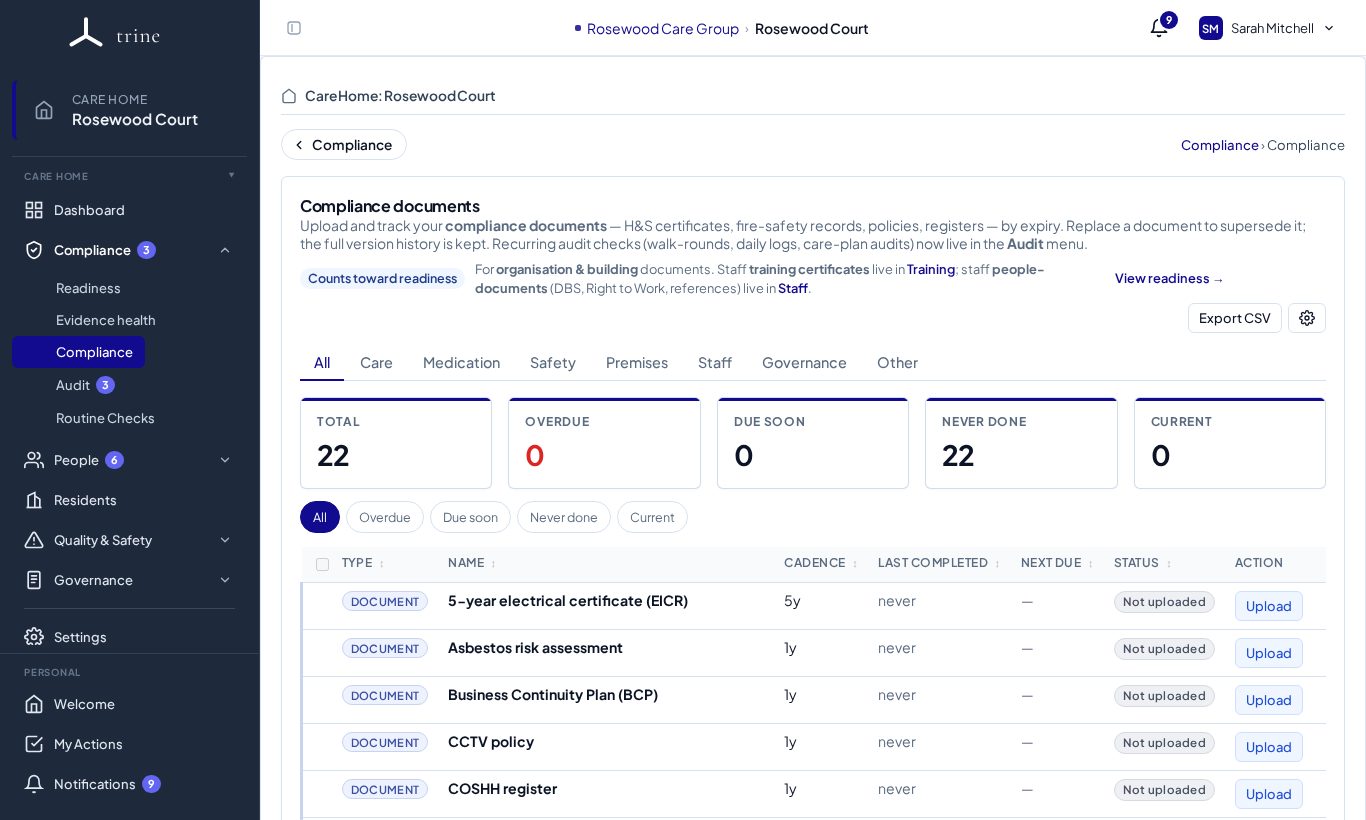
The page
- Tabs filter by area: All, Care, Medication, Safety, Premises, Staff, Governance and Other.
- Cards: Total, Overdue, Due soon, Never done and Current. Click one to filter the list.
- Each row shows the document type (for example 5-year electrical certificate (EICR), Asbestos risk assessment, Business Continuity Plan, CCTV policy, COSHH register), its cadence, when it was last completed, when it's next due, its status and an Upload button.
- Export CSV downloads the list.
How to
- Find the document type and press Upload.
- Choose the file and set the document date (required) and the expiry date. If you leave the expiry blank, Trine suggests one from the type's usual renewal cadence — you can change or clear it.
- Use Replace to upload a newer version; previous versions are kept in the document's history.
- The status comes from the document's own dates: current, due soon, overdue, or never done when nothing is on file.
Good to know
- The Compliance page is for building, health-and-safety and governance records. Recurring quality audits live in Audit, and day-to-day logs in Routine Checks.
- Documents are never deleted — superseded files stay readable in history.
- Which documents apply, and their cadence, are set in Settings → Compliance. Some only apply when relevant (for example the CCTV policy when the home has CCTV).
Related: Compliance settings · Evidence · Audits