Who can use it: every active member can read; managers and administrators publish and manage.
Where to find it
Open People → Staff Resources.
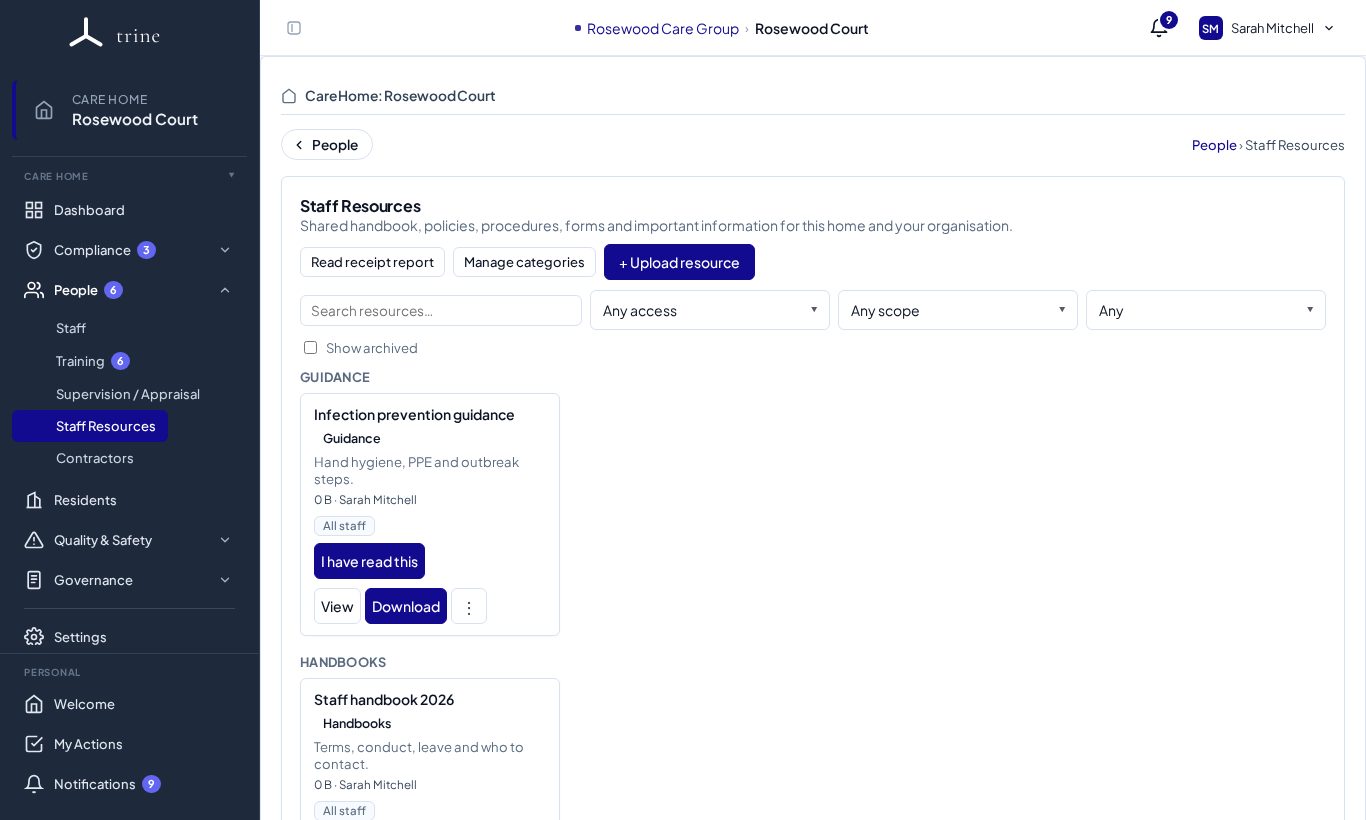
Reading resources
- Browse resources grouped into categories — staff handbook, policies, guidance, forms and templates, local procedures and more. Search, or filter by access and scope.
- View opens a document in Trine; Download saves it; Open link opens a web link resource in a new tab.
- Where a resource asks for it, press I have read this so your manager can see you've read it.
Publishing (managers)
- Press + Upload resource.
- Upload a file (up to 25 MB) or add a web link (https only), give it a title, description and category.
- Choose who can see it — every staff member, chosen job titles, or managers only — and whether it applies to this home or (for provider admins) every home.
- Tick Pin to keep it at the top, and Requires acknowledgement to collect read receipts.
- Use Replace file or Replace link to update a resource while keeping its history; Archive retires it.
Read receipts
Read receipt report shows who has and hasn't acknowledged each resource, and lets you send acknowledgement reminders. Manage categories adds or renames categories.
Good to know
- This library is for reference reading — it is not inspection-readiness evidence and isn't expiry-tracked.
- Agency staff can see Staff Resources too, within the same access rules.
Related: Staff communication · Agency workers and organisations