Your Welcome workspace is the first thing you see after signing in. It brings together what needs attention at your care home.
What's on it
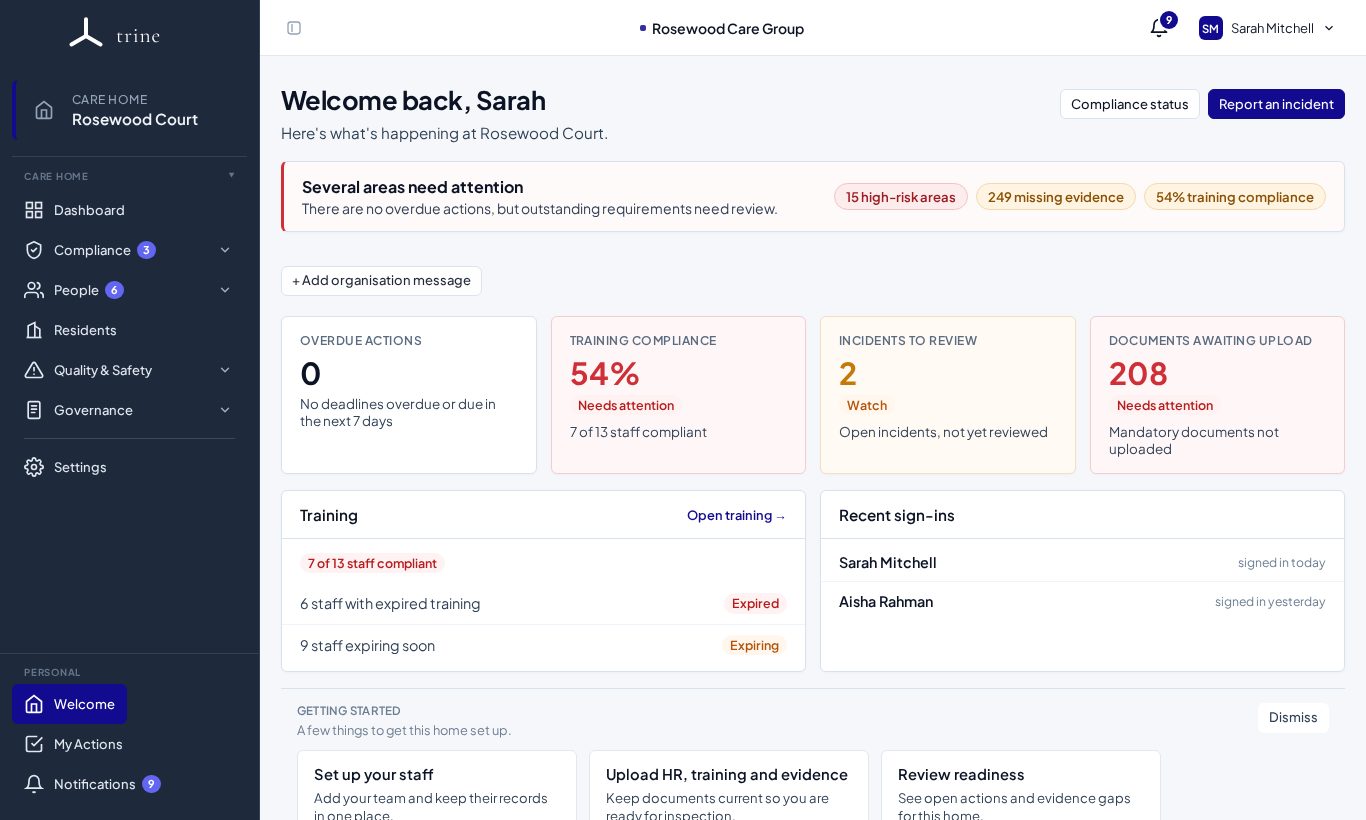
- Greeting and summary — for example "You have no overdue actions at Rosewood Court".
- Summary tiles — Overdue actions, Training compliance, Incidents to review and Documents awaiting upload. Each tile shows a status (Clear, Watch or Needs attention); click one to go straight to the work.
- Training — how many staff are compliant, and how many have expired or soon-expiring training.
- Recent sign-ins — who has signed in recently.
- Getting started — shortcuts for a newer home (set up staff, upload HR and training evidence, review readiness, log an incident). Press Dismiss when you no longer need them.
- Organisation messages — managers can use + Add organisation message to post a notice that everyone at the home sees here.
Quick buttons
- Compliance status opens the home's readiness view.
- Report an incident opens the incident form straight away.
How to
- Sign in — you land here automatically.
- Work through any tile showing Watch or Needs attention.
- Use the menu to open any other section.
Good to know
- Return here at any time with Welcome in the Personal section at the bottom of the menu.
- Readiness and evidence figures show for people who have access to the Dashboard and Evidence menus.
Related: Signing in and switching care home · Find your way around Trine · The dashboard